Template Issues
ISO downloads fail - Use pre-downloaded ISOs for templates
If your Ludus host is unable to download ISOs but your local machine can, you can upload the ISO files to the Ludus host and modify the packer files to point to the existing ISO files.
To do this:
- Download the ISO file locally, then upload it to your Ludus host. You can do this via the GUI or via SCP. The template should end up in a data pool. By default, if using the
localpool, the ISO should end up at/var/lib/vz/template/iso.
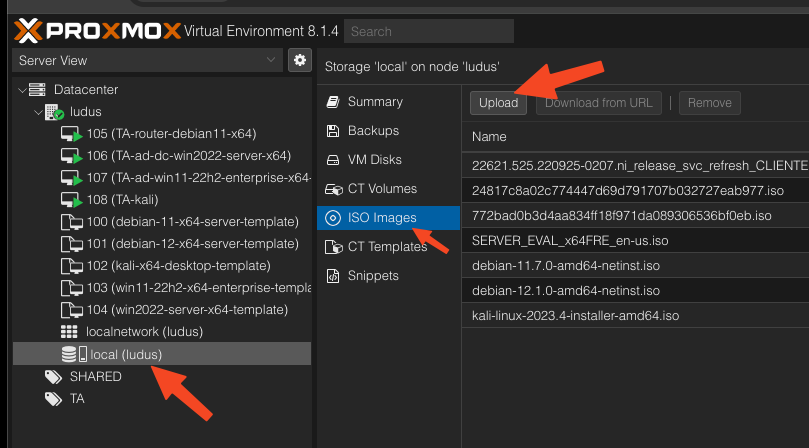
-
Locate the template packer file. Built-in template are at
/opt/ludus/packer/<template>/<template>.pkr.hcl, user added templates are at/opt/ludus/users/<username>/packer/<template>/<template>.pkr.hcl -
Edit the template packer file and change the
iso_urlvalue toiso_file. The format for pool is<poolname>:iso/<isoname>.iso. For example:
Change
variable "iso_url" {
  type    = string
  default = "https://software-static.download.prss.microsoft.com/sg/download/888969d5-f34g-4e03-ac9d-1f9786c66749/SERVER_EVAL_x64FRE_en-us.iso"
}
to
variable "iso_file" {
  type    = string
  default = "local:iso/SERVER_EVAL_x64FRE_en-us.iso"
}
- Also change the second
iso_urlline
iso_url = "${var.iso_url}"
to
iso_file = "${var.iso_file}"
- Build the template with ludus, and it will use the local ISO.
ludus template build -n <template name>
Assuming your iso is stored in the local pool.
Ludus cannot find the template name
Ludus reads the template name from the Packer HCL/JSON directly. Comments and unrelated strings are ignored.
The preferred source of truth is the vm_name value inside a Packer source block:
source "proxmox-iso" "example" {
  vm_name = "example-template"
}
If vm_name references a variable, Ludus resolves it from that variable's default value:
variable "vm_name" {
  type    = string
  default = "example-template"
}

source "proxmox-iso" "example" {
  vm_name = var.vm_name
}
If no source block has a resolvable vm_name, Ludus falls back to the default value of variable "vm_name". To avoid discovery issues, make sure the resolved value is a plain string and ends with -template.
ISO downloads fail - Download with packer instead of PVE
Some templates are configured to download the ISOs directly to PVE instead of downloading via packer to a cache and then uploading.
You can disable this (which may fix stubborn ISO downloads) by changing
iso_download_pve = true
to
iso_download_pve = false
Linux template stuck on Configuring apt - scanning the mirror
The MTU of your Ludus host may be less than the standard 1500, which is the MTU for the vmbr100 "WAN" network and each range network.
If this is the case, you can add mtu 1420 (or the value of your WAN interface's MTU) to /etc/network/interfaces. To make this change apply to users created in the future, edit the template in /opt/ludus/ansible/user-management/vmbr-management.yml to add the MTU value to the interface block.